Crypto Bubbles app download: a safe install on iOS, Android and desktop
Three legitimate routes, nothing to pay, and one trap thousands of people walk straight into: APK files from random websites. Here's where to get the genuine app, how to recognize a clone before it ever touches your phone, and how to configure alerts without turning your pocket into a slot machine.
Where to download Crypto Bubbles safely — and where never to
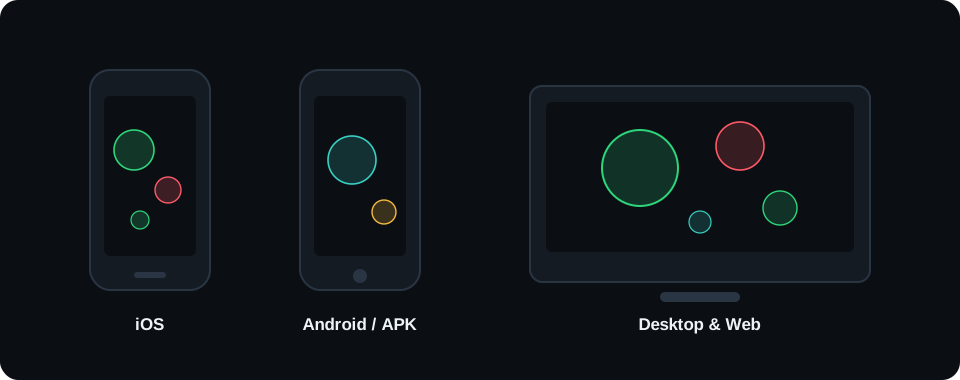
Start with the good news: you don't need to go hunting through forums or "free app" portals. According to the official site cryptobubbles.net, the app is available in three places — and those three places are the only ones that should interest you:
App Store — for iPhone and iPad. Reach the publisher's listing either through the link on the official site or by searching the store by name.
Google Play — for Android phones and tablets. Same principle: the link from the official site is the shortest path to the correct listing.
The web version — runs in any modern browser, no install and no account. On a computer you can additionally "install" it as a PWA, which we cover further down.
Platform list, the free model and ad funding — per the official site cryptobubbles.net (as of July 2026).
Why be so insistent about official stores? Because crypto is a favorite hunting ground for scammers, and a popular free app is perfect bait. The pattern never changes: someone wraps a familiar interface around extra code that, at best, injects additional ads and, at worst, swaps wallet addresses in your clipboard or fishes for seed phrases. Apple's and Google's review processes aren't infallible, but they filter out the overwhelming majority of these attempts. A random page hosting an APK "for faster downloads" filters out nothing at all.
One thing worth internalizing right away: Crypto Bubbles is a market viewer and nothing more. The app has no wallet, accepts no deposits and sells nothing — buying and selling happens on an exchange, not inside the bubbles. What the visualization actually is, and how to read it, is the subject of a separate guide.
Open the official site and follow its App Store link
That removes the risk of landing on a clone in search results. If you'd rather search manually, compare the developer name with the one listed on cryptobubbles.net before you tap anything.
Inspect the store listing
Look at the screenshots (they should show an actual bubble board), the first release date and the reviews. An app that has been in the store for years with thousands of ratings looks nothing like a clone published three weeks ago.
Download and launch
The install is free and needs no payment method. On first launch the app will, at most, ask permission to send notifications — you can decline for now and enable it later when you set up alerts properly.
Tune the view to your needs
Pick a time window (day or week is a sane starting point), scan the board, and add a few coins to your watchlist. How to read colors and sizes without fooling yourself is covered in our bubble chart guide.
Android: installing from Google Play
Go to Google Play through the official link
Exactly as on iOS: the link from cryptobubbles.net leads to the correct publisher listing. Inside the store, pay attention to the developer name — clones typically differ by a single letter or add a suffix like "Pro" or "2026".
Check the permissions before installing
Open the "Data safety" section and see what the app declares. A market viewer needs internet access and, optionally, notifications. A request for contacts, SMS or file access means you're looking at something other than the original.
Install and open it
One tap, a few seconds of downloading, done. No fees, no activation codes, no registration. If the app demands an ID-document login on first launch, uninstall it — that is not Crypto Bubbles.
Configure alerts and widgets
Android lets you drop a shortcut or widget on the home screen and manage notification channels precisely in system settings. Limit alerts to a handful of thresholds that genuinely matter while you're at it.
Desktop: the web version and installing it as a PWA
On a computer the browser version is the most comfortable option — not least because a board with several hundred bubbles simply looks better on a large screen. And if you use it daily, install it as a PWA (Progressive Web App): you get a dedicated window, an icon in the dock or Start menu, and one-click launch with no browser tabs crowding the view.
Open the web version in Chrome or Edge
Firefox and Safari will render the board fine, but full desktop PWA installation is best supported by Chromium-based browsers. On macOS, Safari now offers something similar with its "Add to Dock" option.
Click the install icon in the address bar
In Chrome it's the small monitor-with-an-arrow symbol at the right end of the address bar; alternatively use the ⋮ menu → "Save and share" → "Install". In Edge: … menu → "Apps" → "Install this site as an app".
Confirm and pin it
Once confirmed, the app opens in its own window. Pin it to the taskbar (Windows) or the Dock (macOS) and you're one click from the full market map, which we explore further in our map guide.
Uninstalling, if you change your mind
Remove a PWA like any other app: Windows — Settings → Apps; macOS — from the Chrome apps folder. No leftovers, no drivers, no registry to clean up afterwards.
Risk zone
APK files: when they make sense, and when you're asking for trouble
Now the part many of you came here for. "Crypto bubbles APK download" gets typed into search engines thousands of times a month — and, security hat on, it's a trap of a phrase. Sideloading, meaning installing an app from an APK file outside Google Play, has legitimate uses on Android: devices without Google services, internal testing, regions where the store is blocked. The problem is that roughly 99% of people searching for an APK are in none of those situations. They just clicked the first result that promised a "faster download".
What are you actually risking with an APK from a random site? First, modified code: the file may have been repackaged with adware attached or — in the malicious version — with a so-called clipper that replaces any wallet address you copy with the attacker's. In a crypto context that's not hypothetical hand-waving; clippers have been among the most common families of mobile malware for years. Second, no updates: an app from outside the store won't receive automatic patches, so you're left with an old, potentially vulnerable build. Third, no signature verification: the average user won't check whether the certificate that signed the package belongs to the real publisher, and that certificate is the only hard guarantee of authenticity that exists.
Practical rule: if a free app is available in your platform's official store, installing it from an APK gains you exactly nothing and adds risk. Keep sideloading for situations where you genuinely have no alternative, and even then download only from a source the publisher itself points to.
Fake-app red flags — a checklist
Whatever the platform, run your eye down this list before installing. One hit is enough to walk away:
The developer name doesn't match the one on the official site — or differs by a typo, a hyphen, or a bolted-on "official".
The app asks for money to download, to "activate premium" or to "unlock live data". The original is free and ad-funded — per cryptobubbles.net.
It asks for a seed phrase, private keys or card details. A market viewer has no business requesting any of those. Full stop.
Brand-new release date plus glowing ratings. A hundred five-star reviews posted over one weekend is the signature of a review farm, not of delighted users.
Strange permissions: SMS, contacts, or Accessibility services. Those are the classic vectors for hijacking 2FA codes and drawing phishing overlays on top of other apps.
Screenshots that show no bubbles — generic charts, or worse, profit promises. "Earn 500% a day" is not the language of a data visualization tool.
A download page that rushes you. Countdown timers, "3 copies left", "your device is at risk" banners: pressure is a tell. Real stores never need it.
The same vigilance will serve you later on, incidentally. Fake exchange apps are even more common than fake market viewers, because there the payoff is immediate — your money. Before you install anything that touches funds, check the publisher twice.
Hardware and resources
Requirements, battery and data usage
Nothing to stress about: Crypto Bubbles is a lightweight app. Any phone from the last six or seven years — say an iPhone 8 or newer, or an Android device with 3 GB of RAM — will handle the board without breaking a sweat. On desktop, a current browser is all it takes; animating a few hundred bubbles uses hardware acceleration and you won't notice it even on a laptop that's a few years old.
Two things are worth knowing before you leave the app open all day, though:
Battery. The bubbles are in constant motion and the data refreshes automatically every few dozen seconds (that's how the official site describes it). Continuous animation means continuous GPU work, so a permanently open board can visibly shorten your phone's runtime. Auditor's advice: check the market in sessions of a few minutes rather than keeping the app in the foreground — nobody can meaningfully look at a thousand bubbles for an hour anyway.
Data. The app pulls text (prices, market caps, percentage changes), not video streams. Even with regular use we're talking about single-digit megabytes a day — the ads can consume more than the quotes do. On roaming or a capped plan it's irrelevant.
Permissions: what the app needs, and what it has no business asking for
This is the shortest security audit you'll read this year. A market data viewer needs exactly two things: internet access (to fetch quotes) and, optionally, notification permission (to deliver price alerts). That's the list. It does not need location, microphone, camera, contacts, SMS or file access. It doesn't create a KYC account, because it holds no money — identity verification belongs to exchanges, where transactions actually happen. And that division is healthy: a tool for looking shouldn't know who you are.
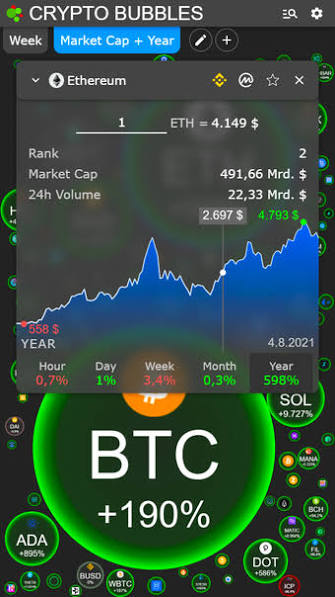
A coin card in the mobile app: chart, market cap, volume. No fields for passwords, cards or seed phrases — exactly as it should be.
Notifications and price alerts: set once, then relax
Alerts are the most underrated feature of the mobile app, because a well-configured alert replaces compulsive board-refreshing. The mechanics are simple: pick a coin, set a price threshold ("tell me if ETH drops below X"), and your phone only wakes you when the market does something you actually care about.
A few field-tested rules to keep alerts working for you rather than against you. Set thresholds at levels where you would genuinely take some action — not "every 2%", because a week later you'll switch everything off in irritation. Keep the list to coins you understand; an alert about a memecoin whose name you can't pronounce is noise, not information. And never decide from the notification itself: an alert says something happened, not what to do about it. Before you touch anything on an exchange, look at the wider context — starting with the time windows on the bubble chart.
A good alert is one you already know how to respond to. Everything else is noise.
When something breaks
Troubleshooting: blank board, stale data, crashes
Empty or white board after launch. Nine times out of ten it's connectivity: the app is waiting for its first data payload. Check your connection, give it a few seconds, pull down to force a refresh. If you're on a VPN or a corporate network with filtering, try without them — some firewalls block data-aggregator domains outright. In the web version an aggressive ad blocker is another frequent culprit, since it may cut the requests carrying quotes along with the ad calls; allowlist the page and reload.
The data looks out of date. Compare a large coin's price against an exchange quote. Differences of a fraction of a percent are normal — the board refreshes every few dozen seconds and aggregates several sources, while an exchange shows its own order book in real time. If the gap is large and persistent, close the app completely (swipe it out of memory, don't just minimize) and reopen. In a browser, a hard reload (Ctrl+Shift+R) clears the cached payload.
The app freezes or quits. In order: check for a store update, restart the phone, clear the app cache (Android: Settings → Apps → Storage → Clear cache). On older devices, narrowing the view to fewer bubbles helps — a thousand animated objects are still a thousand animated objects. If nothing works, uninstall and reinstall from the official store; locally stored watchlists may disappear in the process, so write them down first.
Notifications never arrive. Check three layers: notification permission in system settings, whether Do Not Disturb is on, and — on Android — whether the system has put the app to sleep for battery optimization (Settings → Battery → exclude this app from optimization). That third one breaks alerts most often and almost nobody knows about it.
The PWA won't install. The install icon only appears when the site is served over HTTPS, is not already installed, and you're in a Chromium-based browser outside a private window. If the icon is missing, check those three conditions in that order; incognito mode is the usual answer.
iOS versus Android versus web: what you get on each platform
Feature
iOS (App Store)
Android (Google Play)
Web / desktop PWA
Price
Free*
Free*
Free*
Bubble board, 5 time windows
Yes
Yes
Yes
Push price alerts
Yes
Yes
Limited — depends on the browser
Background work / widgets
Basic
Extensive (widgets, notification channels)
Not applicable
Comfort on a large screen
iPad — good
Tablet — good
Best: hundreds of bubbles at once
Installing outside the store
No
Possible (APK) — we advise against it
Unnecessary: it just runs
Updates
Automatic from the store
Automatic from the store
Always the latest build
* Platform availability and the free model — per the official site cryptobubbles.net (as of July 2026).
Our recommendation after months of using all three variants: desktop for analysis, phone for alerts. On a big screen the board shows its full value — market cap proportions register immediately and clicking through coin cards doesn't tire you out. Let the phone do what phones do best: wake you only when something matters. And if you want to understand what bubble size really measures, and why comparing market caps beats comparing unit prices, head over to our CoinCompare calculator guide.
The short version of this page
Download only from the App Store, Google Play or the web version at cryptobubbles.net — ideally via links on the official site.
The app is free. Any request for payment, a seed phrase or card details means you're looking at a fake.
APKs from random sites are unnecessary risk: repackaged code, no updates, clippers that swap wallet addresses.
On desktop, install the PWA from Chrome or Edge — its own window, one click, no installers.
Set alerts at thresholds you'd actually act on, and make decisions after checking context, never straight from a notification.
FAQ
Frequently asked questions about downloading Crypto Bubbles
Is downloading the Crypto Bubbles app free?
Yes. According to the official site cryptobubbles.net, the app is free on iOS, on Android and in the browser, and the project is funded by advertising. If any site asks you to pay to download or to "unlock" the app, you are not looking at official distribution.
What are the official download sources?
The App Store for iOS, Google Play for Android, and the web version at cryptobubbles.net, which can also be installed as a PWA. The safest route into the stores is through the links on the official site — that way you know you have landed on the right publisher listing.
Is installing from an APK file safe?
Usually it is risk you do not need to take. An APK obtained outside Google Play skips the store's review and may have been modified — anything from bolted-on adware to code that steals data. Since the app is free and available in the official store, sideloading buys you nothing except an extra attack surface.
Does Crypto Bubbles work offline?
Not in any useful sense. The app visualizes live market data, so without a connection you will see the last cached state of the board at best. A basic mobile connection is plenty, though — the data it pulls is tiny.
How do I install Crypto Bubbles as an app on Windows or Mac?
Through the PWA mechanism. Open the web version in Chrome or Edge, click the install icon in the address bar (or menu, then Install app), and a shortcut appears on your desktop and in the Start menu or Launchpad. The app then runs in its own window with no browser chrome around it.
Why does the app have no wallet and no KYC login?
Because it buys nothing, sells nothing and holds nothing. Crypto Bubbles is a market data viewer, so it has no use for your ID documents, card number or seed phrase. If some version of the app asks for them, you are dealing with a clone or a phishing page.
App installed? Time for the next step
The bubbles will show you the market, but you'll be buying somewhere else. Pick a regulated exchange, turn on 2FA from day one, and start with amounts whose loss wouldn't hurt.